
Key Takeaway
- A checklist and an audit are different jobs. The checklist confirms conditions on the ground today, the audit asks whether the system that produces those conditions is working.
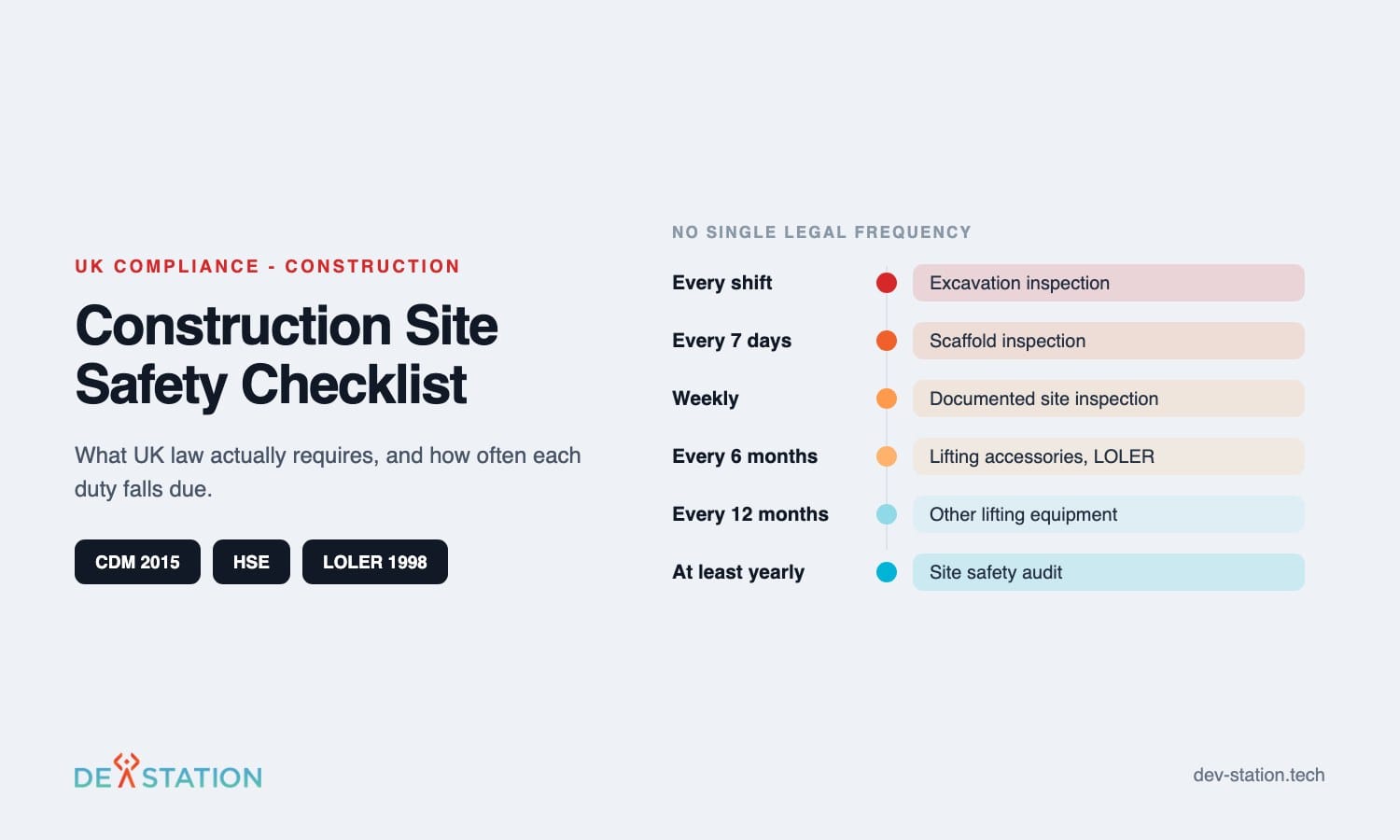
- UK law does not set one inspection frequency for a whole site. It sets specific ones: scaffolds every 7 days, excavations at the start of every shift, lifting accessories every 6 months.
- Most template libraries are written to OSHA. On a UK site the duties come from CDM 2015 and the Work at Height Regulations 2005, and the wording on your checklist should match them.
- A checklist that takes longer than one walk of the site will be completed in the cabin at the end of the week. Cap the item count before you add anything else.
- The finding is worth nothing without an owner and a date on the same line.
Overview
01
What a construction site safety checklist is actually for
Search for this and you get templates. Dozens of them, mostly free, mostly written against American regulations.
A construction site safety checklist is a fixed list of conditions that one person confirms while walking the site. It answers a narrow question: is the site safe right now. That is all it does, and the narrowness is the point.
Pricing moves every year. What the platforms charge now, what changed in 2026, and where a custom build starts to beat per-seat licensing are all in our read of the digital inspection market.
The confusion starts when the same document is asked to serve as a construction safety audit. An audit examines whether your arrangements work at all: whether inductions happen, whether the construction phase plan is being followed, whether last month findings were closed. A checklist cannot answer that, because it only ever looks at today.
This guide covers both, in UK terms. What the law names, what belongs on the list, how a site safety audit differs, and how to write the thing so that people on site complete it honestly.
The Law
02
What UK law names, and how often
There is no single legal frequency for inspecting a construction site. That surprises people who arrive expecting one number.
What exists instead is a set of specific duties attached to specific hazards, plus a general duty to monitor. Under CDM 2015 the principal contractor has to plan, manage, monitor and coordinate the construction phase, prepare a written construction phase plan before work begins, then review and revise it as the job changes. The Health and Safety Executive states the duty in those words.
| What the law names | Who does it | When |
|---|---|---|
| Construction phase plan | Principal contractor | Written before the construction phase begins, then reviewed and revised through the job |
| Site specific induction | Principal contractor | Every worker, before they start on that site |
| Scaffold inspection | A competent person | Before first use, then every 7 days, and after anything likely to cause deterioration such as bad weather or alteration |
| Excavation inspection | A competent person | At the start of every shift, and after any event that may have affected strength or stability |
| Thorough examination of lifting equipment | A competent person, under LOLER 1998 | Every 6 months for lifting accessories and anything that lifts people, every 12 months for other lifting equipment, or to a written examination scheme |
| Notification to HSE on form F10 | The client | Work scheduled to last over 30 working days with more than 20 workers at the same time, or to exceed 500 person days |
Read the table as the skeleton of your checklist rather than as background. Each row is a question a visiting inspector can ask, and each one has a documented answer or it does not.
A generic construction phase plan is not compliance. The plan has to be specific to the project and proportionate to its risks. A template with the site name typed into the header fails that test, and it fails on exactly the small jobs where nobody expected a visit.
Cost
03
What an unannounced HSE visit costs
Construction sites are inspected without warning. That is the basis on which the whole regime works.
If the inspector finds what HSE calls a material breach, meaning something serious enough that they write to you formally requiring action, you pay for their time under fee for intervention. The rate is 188 pounds an hour from 1 April 2026, and it covers the time taken to identify the problem and see it put right, office work included. Advice alone carries no fee.
Read that charging basis carefully, because it changes what your paperwork is worth. The bill is a function of inspector hours, so every hour spent waiting for you to locate the last six scaffold inspection reports is an hour you are paying for at the same rate as the inspection itself.
That is the least discussed reason to keep inspection records where they can be produced in a minute. Nobody buys an inspection system to reduce a fee for intervention invoice, and the saving is real all the same.
Contents
04
Six areas that belong on a UK building site health and safety checklist
Most template libraries give you five or six headings. These are the ones that carry UK specific wording.
Access, security and welfare
Hoarding intact, signing in working, no way onto the site for someone who should not be there. Welfare has to be provided from the start of the job, not once the groundworks are finished.
Work at height
Scaffold tag dated inside 7 days, edge protection complete, ladders tied and at the right angle. Openings and voids count as work at height even at ground level.
Excavations and ground
Support in place, edges protected, spoil set back, buried services traced before anyone digs. This is the one item that has to be confirmed at the start of every shift rather than weekly.
Temporary electrics
Reduced low voltage supply where it is the site standard, leads off the ground and undamaged, distribution boards locked. Record the test dates rather than the impression that it all looked fine.
Plant, lifting and vehicles
Pedestrians separated from plant, banksman present where visibility is poor, and in date thorough examination certificates for chains, slings and anything that lifts a person.
Fire, dust and substances
Hot works permit closed out with a fire watch, extinguishers where the work is, silica dust suppressed at the tool. Chemical storage checked against the assessment that authorised it.
Add a seventh area only when your own accident book says you need one. A construction safety inspection checklist grows by accretion, and length is what kills completion rates.
Checklist vs Audit
05
How a site safety audit differs from a daily check
HSE describes proactive monitoring as site tours, inspections and audits. Three words, three different exercises, and they get flattened into one document more often than not.
| Exercise | Who does it | How often | What comes out of it |
|---|---|---|---|
| Daily walk and checklist | Site supervisor | Start of the shift | A signed list, with anything failing raised on the spot |
| Documented site inspection | Site manager or safety adviser | Weekly, and to the specific rules for scaffolds and excavations | A written report naming the person who inspected, the faults and the actions |
| Site safety audit | Someone outside the daily running of that site | Monthly or quarterly, and at least once a year for the whole system | Findings about the arrangements themselves, including whether earlier actions were closed |
The distinction matters commercially as well as legally. When a client asks for a professional site safety audit, they are asking whether your management system holds up, and a folder of completed daily checklists is not an answer to that question.
A construction site safety audit runs off a different document. A site safety audit checklist asks about arrangements, records and whether actions were closed, where the daily list asks about handrails and cable runs.
Construction safety audits are also where repeat findings surface. One loose handrail is a defect. The same handrail open on four consecutive weeks is a failure of the process that closes actions, and only the audit view shows it.
Building It
06
How to create a construction site checklist people will complete
The template is the easy part. A construction safety checklist template or a construction safety audit checklist pulled from a library gives you a structure and nothing that is specific to your sites. Getting it filled in honestly, by a supervisor with twenty other jobs that morning, is the part that fails.
- Start from your own accident book. Pull the last two years of incidents and near misses. The hazards that actually hurt people on your sites earn a line before anything a generic template suggests.
- Write items as conditions, not topics. Scaffolding is a topic and nobody can fail it. Scaffold tag dated within the last 7 days is a condition, and it is either true or it is not.
- Cap the length at one walk. Twenty to thirty items that fit a single circuit of the site. A checklist that needs an hour gets completed at a desk on Friday, and at that point you are collecting fiction.
- Put the owner and the date on the same line as the finding. A defect logged without a name and a deadline is a record that you saw the problem, which is worse than not looking.
- Version it by site type. A refurbishment in an occupied building and a new build on a green field do not share a hazard profile. Two short lists beat one long list that covers both.
Review the list quarterly against what the site actually reported. Items that never fail are either genuinely under control or nobody is reading them, and both cases deserve an answer.
Going Digital
07
Moving off paper without losing the evidence
The reason to digitise is not speed. It is that the legal artefact is the written report, and paper reports have a habit of staying in a van.
HSE expects a written report after most inspections, naming the competent person who carried it out and available on site. Handwriting on a damp A4 sheet satisfies that in theory. It fails in practice when someone asks for the scaffold inspections for the last six weeks and three of them cannot be found.
Digital construction safety checklists change four things that matter. Photographs attach to the item rather than arriving in a separate email. Failed items raise an action with an owner automatically. Records become searchable by date, site and inspector.
The fourth is the one people do not expect. A repeat offender view across every site is the audit evidence nobody can assemble from paper, and it is usually what turns a checklist project into a management tool.
One requirement sits above the others on a construction site: the app has to work with no signal. Basements, lift shafts and rural groundworks have no coverage, and a form that needs a connection to save is a form that loses the inspection. Our guide to offline first inspection apps covers how that is built.
If you are still weighing the change itself, we compared the two approaches directly in digital inspection versus paper inspection, and the wider tool category is covered in our guide to choosing a safety inspection app.
Working With Us
08
How Dev Station builds this for contractors
We build custom inspection apps for companies whose checklists have outgrown a spreadsheet and do not fit an off the shelf product.
On construction work that usually means three things: forms that match your own wording rather than a vendor template, offline capture that survives a basement, and reporting that rolls findings up across sites so the audit has something to look at. Where a client already runs a compliance system, we build to its API instead of proposing a replacement.
Our engineers work from Vietnam with overlap into UK GMT hours, and we invoice in GBP. Send us your current checklist, in whatever state it is in, and we will tell you which parts are worth rebuilding and which are fine on paper.
For lifting equipment specifically, the compliance detail differs and we covered it separately in our guide to LOLER inspection software.
FAQ
09
Frequently asked questions
What site managers ask when rebuilding their safety paperwork.
What should a construction site safety checklist include?
Access and welfare, work at height, excavations, temporary electrics, plant and lifting, and fire with hazardous substances. Write each item as a condition that can pass or fail, and keep the whole list inside one walk of the site. A construction site inspection checklist covering the whole job carries the same six areas plus whatever your own incident history points at.
How often does UK law require a site safety inspection?
There is no single frequency for the site as a whole. Specific duties apply to specific hazards: scaffolds before first use and then every 7 days, excavations at the start of every shift, lifting accessories every 6 months under LOLER 1998. Beyond those, the principal contractor has a general duty to monitor, and weekly documented inspection is the common interpretation.
What is the difference between a construction safety audit and an inspection?
An inspection looks at the site. An audit looks at the system that manages the site, including whether inspections are happening and whether findings get closed. A client asking for a site safety audit wants the second one.
Is a template construction phase plan acceptable?
No. The plan has to be specific and proportionate to the risks of that project, and a generic document with the site name changed does not meet the requirement under CDM 2015.
Does a digital checklist still count as a record?
Yes, provided it captures what the written report would: who inspected, when, what was found and what was done. The format is not the requirement. Being able to produce it when asked is.
Who counts as a competent person?
Someone whose knowledge, training and experience match the thing being inspected. HSE phrases it that way rather than naming a qualification, which means the test is whether the person understands the dangers and the precautions for that specific scaffold, excavation or lift.
Want an AI assistant to summarize or cite this guide?
Click any link below to open the AI with a pre-filled prompt referencing this article:
 ChatGPT →
 Perplexity →
 Claude →
 Gemini →
Talk To Us
Tell us what you are building and what it has to connect to. An engineer answers, and you get a straight view of what the work would take.
Get In Touch →

