
Key Takeaway
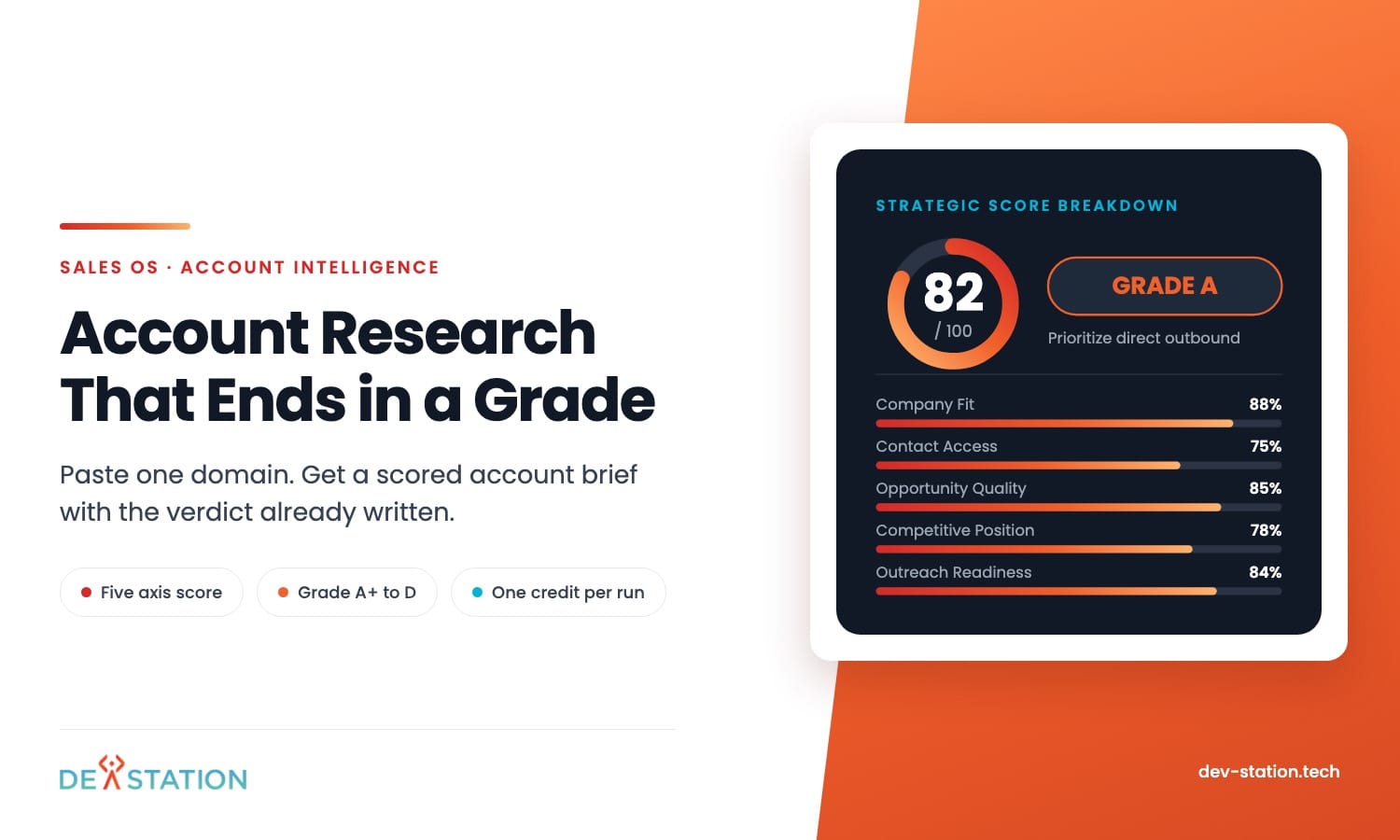
- Sales OS takes one input, a prospect domain, and returns a graded account brief. One credit per run.
- The grade rests on six axes, from Company Fit through to Why-Now, the one that asks whether anything makes this the right month to call.
- The free tier opens the Account Brief: composite score, firmographics, detected tech stack, expansion openings and deal risks.
- Pro opens five further tabs covering verified contacts, qualification, outreach sequences, deal prep and export.
- Grade quality follows the ICP you save in settings. Loose criteria produce loose grades, and the settings page is where you correct that.
Overview
01
What Sales OS does
Account research usually dies in a browser tab.
You open the prospect website, then the LinkedIn page, then a funding article, then their pricing page, and you still cannot say whether the account deserves an email this week. Sales OS collapses that into one action. Paste the domain, press Analyze, and the engine crawls the site, scores the account against your saved ICP, and writes a verdict you can act on.
The verdict arrives as a sentence you can act on. Prioritize direct outbound to the Head of Operations and the IT lead. Deprioritize, poor ICP fit, service provider rather than asset owner. That line sits at the top of every account, next to the grade.
The Run
02
One domain in, one graded brief out
A run costs a single credit and produces a permanent record in your workspace.
- Enter the domain. The field sits in the top bar on every screen, so you can queue an account without leaving the one you are reading.
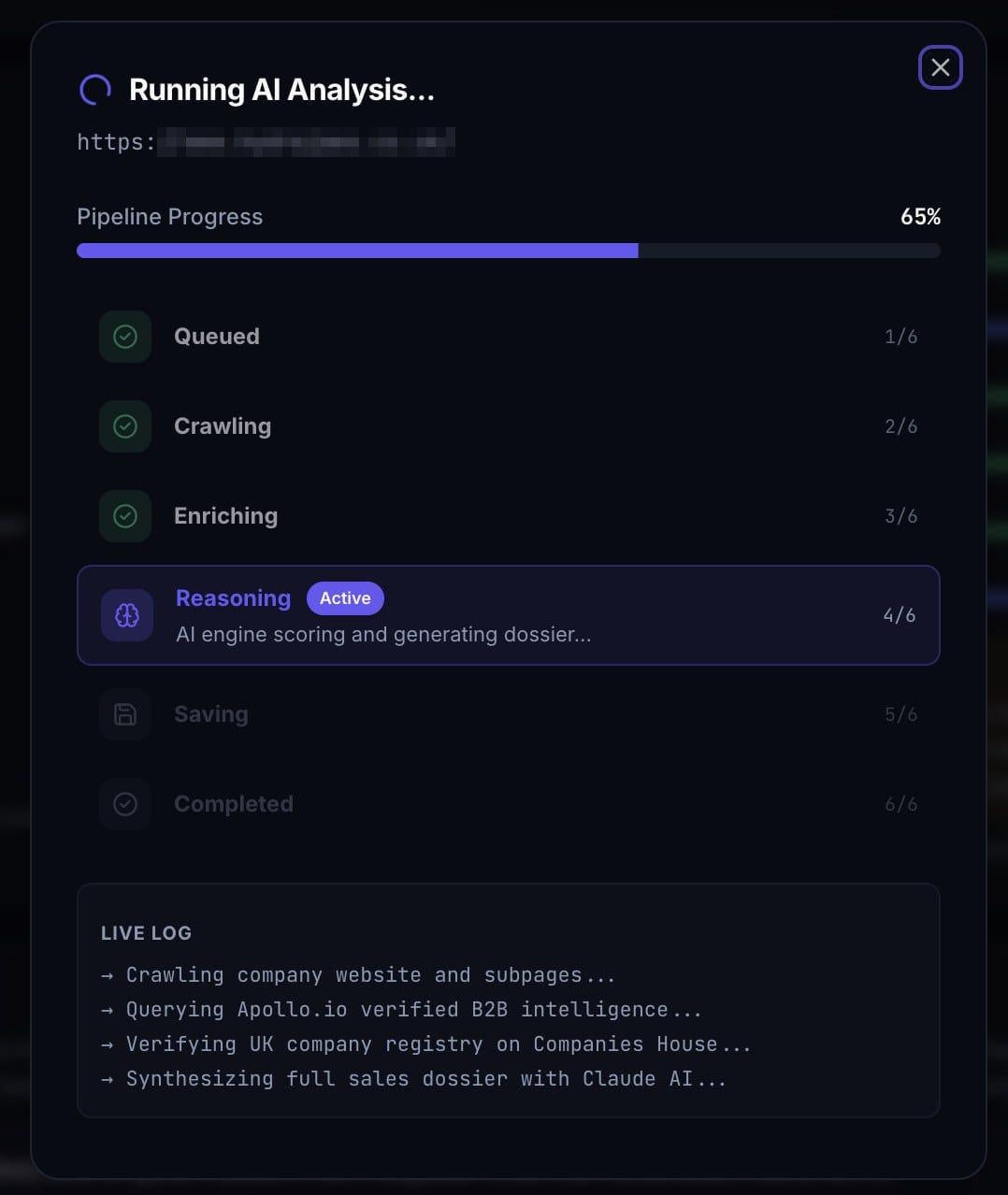
- The engine crawls and enriches. It reads the public site, detects the technology stack, and pulls firmographics such as business model, headcount band and revenue band.
- It scores against your ICP. The six axes are computed from the seller profile and target criteria you saved, so two workspaces grade the same domain differently.
- The account lands in your list. Ranked by score, filterable by name or domain, and filterable by grade from A+ down to D.
Scoring
03
Six axes behind the grade
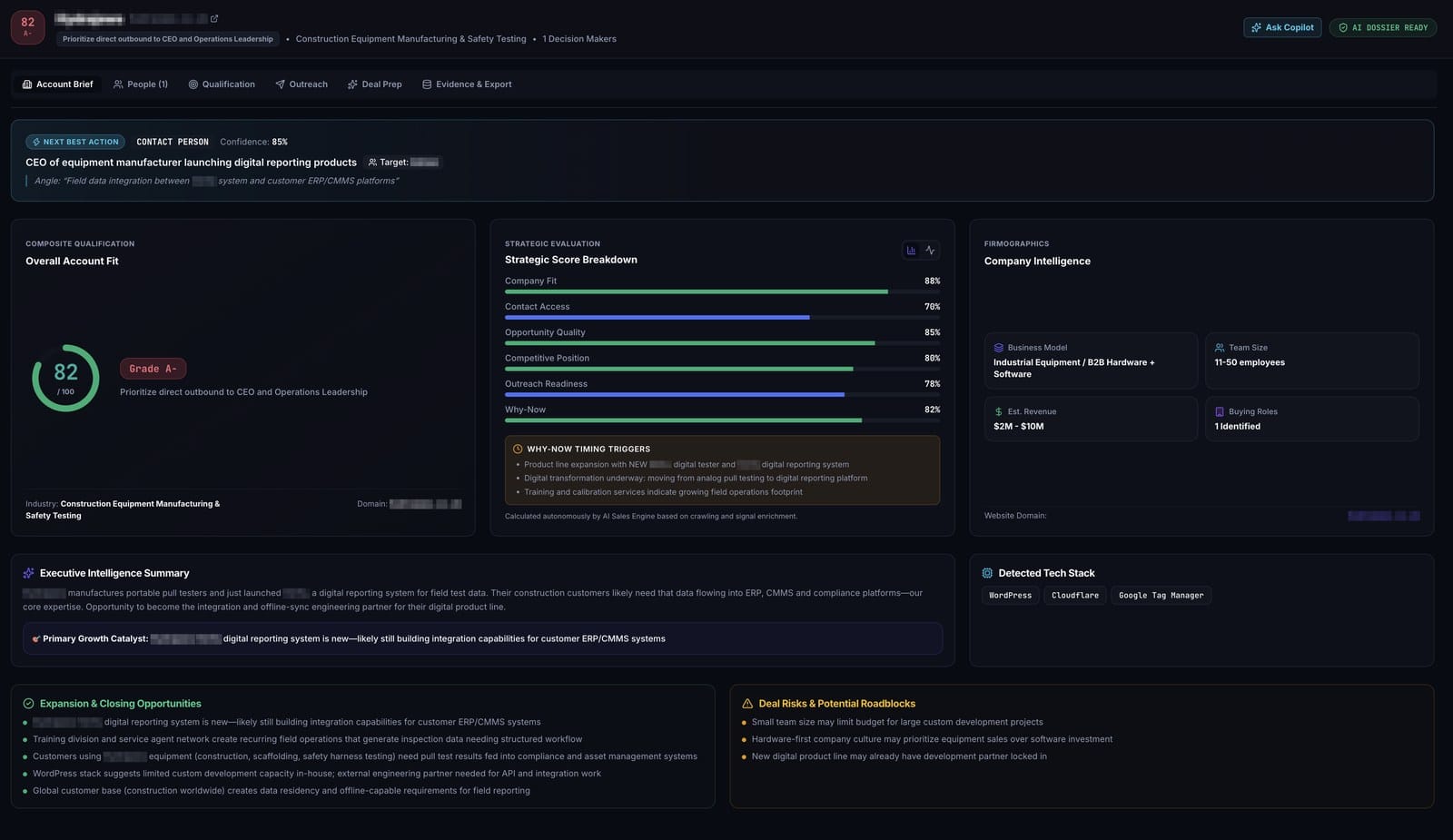
A single composite number hides the reason you would win or lose. Sales OS prints the composite out of 100, a letter grade, and then the five components underneath it, each with its own percentage, so you can see which part of the account is weak before you commit a week to it.
- Company Fit. How closely the firmographics and business model match the ICP you defined.
- Contact Access. How reachable the buying committee looks. A high overall score with weak access means the account is worth pursuing and hard to enter.
- Opportunity Quality. The size and shape of the problem the account appears to have.
- Competitive Position. What they already run, and how entrenched it is.
- Outreach Readiness. Whether there is enough material to write a first email that earns a reply.
- Why-Now. Whether anything makes this the right month. A box underneath lists the timing triggers it found, such as a product line expansion or a move from analog to digital reporting.
A toggle switches the breakdown between bar and radar view. Above it sits a Next Best Action strip naming the person to contact, a confidence percentage and the angle to open on.
People
04
Who to call, and who signs
Six tabs sit across every account: Account Brief, People, Qualification, Outreach, Deal Prep, and Evidence and Export. The brief is free on every plan, the other five open on Pro.
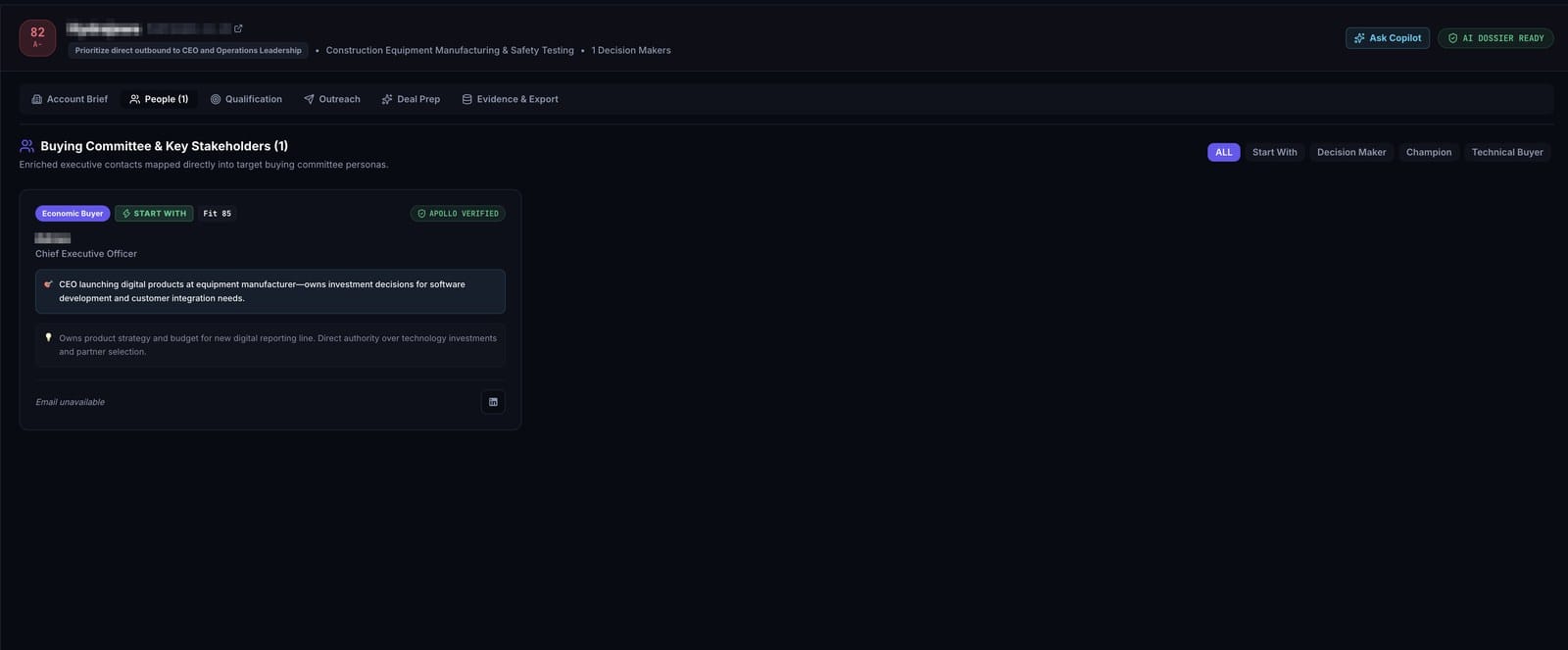
The People tab gives every person on the committee a card of their own.
Each card carries a persona label such as Decision Maker or Technical Buyer, a fit score for that individual, and two notes: why the person matters here, and what authority they hold. One card gets a START WITH marker, so a rep opening the tab cold knows where to begin.
Contacts resolved through Apollo carry a verified badge. Where no address comes back, the card prints Email unavailable. A tool that also drafts your first email should say when it holds no address, and this one does.
Qualification
05
BANT and MEDDIC, scored and sourced
This is the tab that earns the subscription.
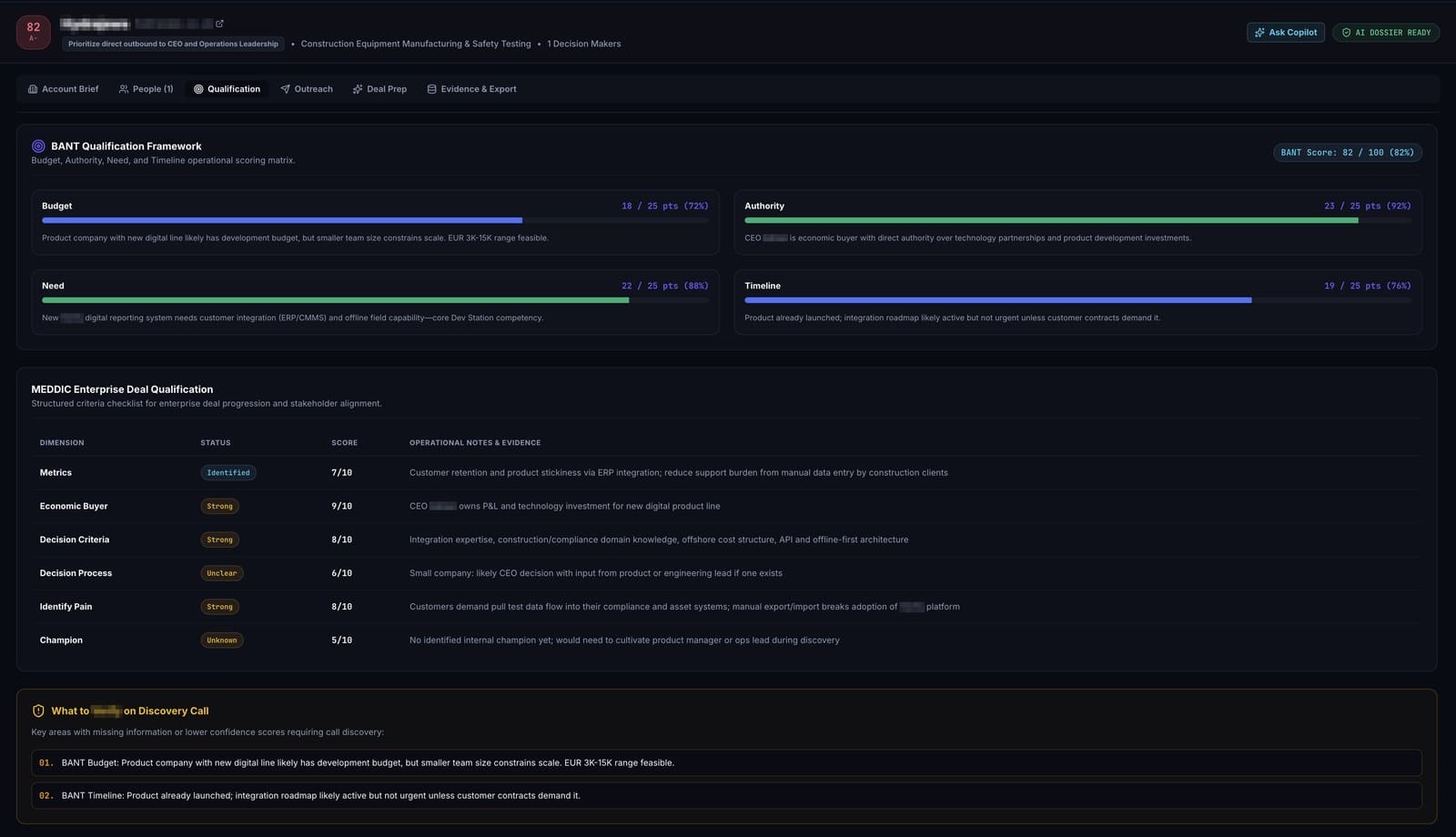
BANT runs first: Budget, Authority, Need and Timeline, each scored out of 25 with a one line reason underneath. The reasons stay concrete. Authority scores 23 out of 25 when the chief executive holds direct sign-off, and Timeline sits at 19 when the product has already launched but the integration roadmap is not urgent yet.
MEDDIC follows as a table, six dimensions deep, each with a status, a score out of 10 and an evidence note.
| Dimension | Status | What the note carries |
|---|---|---|
| Metrics | Identified | The operational number the account could move, such as manual logging time on field tests |
| Economic Buyer | Strong | Named when one person controls budget directly |
| Decision Criteria | Strong | What the account will judge the purchase on |
| Decision Process | Unclear | Marked unclear when the team is small and the process is informal |
| Identify Pain | Strong | The gap between how they work now and what they have announced |
| Champion | Unknown | Marked unknown when nobody beyond the signer appears |
Underneath sits a block called What to Verify on Discovery Call, where the tab gathers its own low confidence areas into a numbered list. A research tool that publishes its own gaps is rarer than it should be.
Outreach
06
A cadence with dates on it
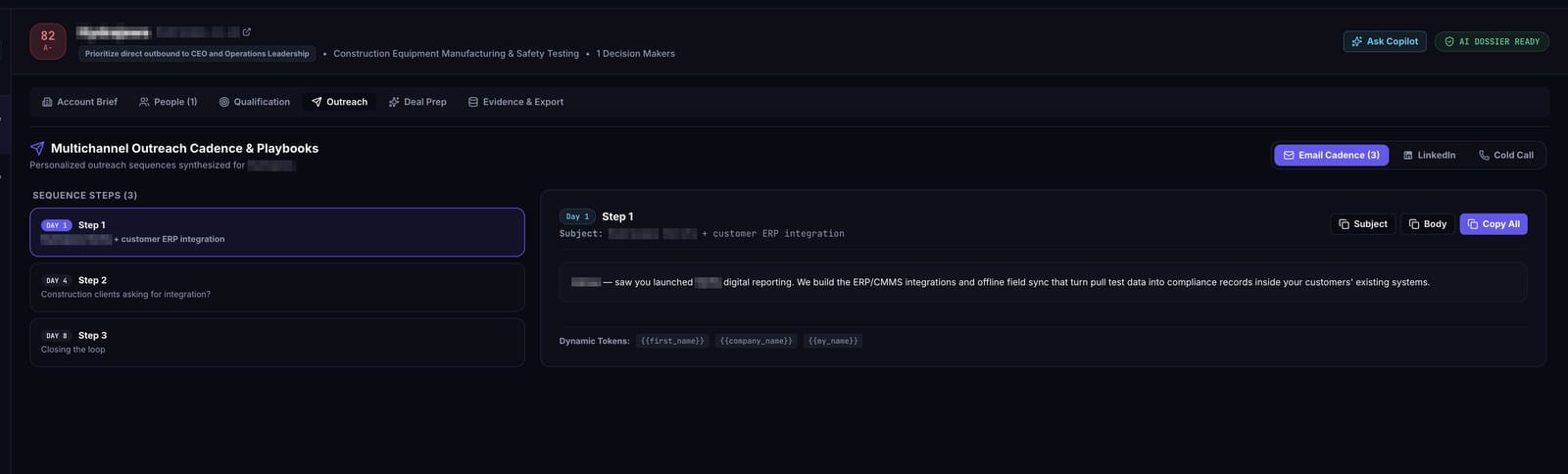
Three channels sit behind tabs: email cadence, LinkedIn, and cold call.
The email cadence arrives with dates on it. Step one on day one, step two on day four, step three on day eight, each with its own subject and body, each built from a signal the brief already found. A step that opens on a product the account launched last month reads like a person wrote it, because the fact underneath is real.
Every step carries merge tokens, and buttons copy the subject, the body or both into whatever sequencer the team runs.
Deal Prep
07
What to say when they push back
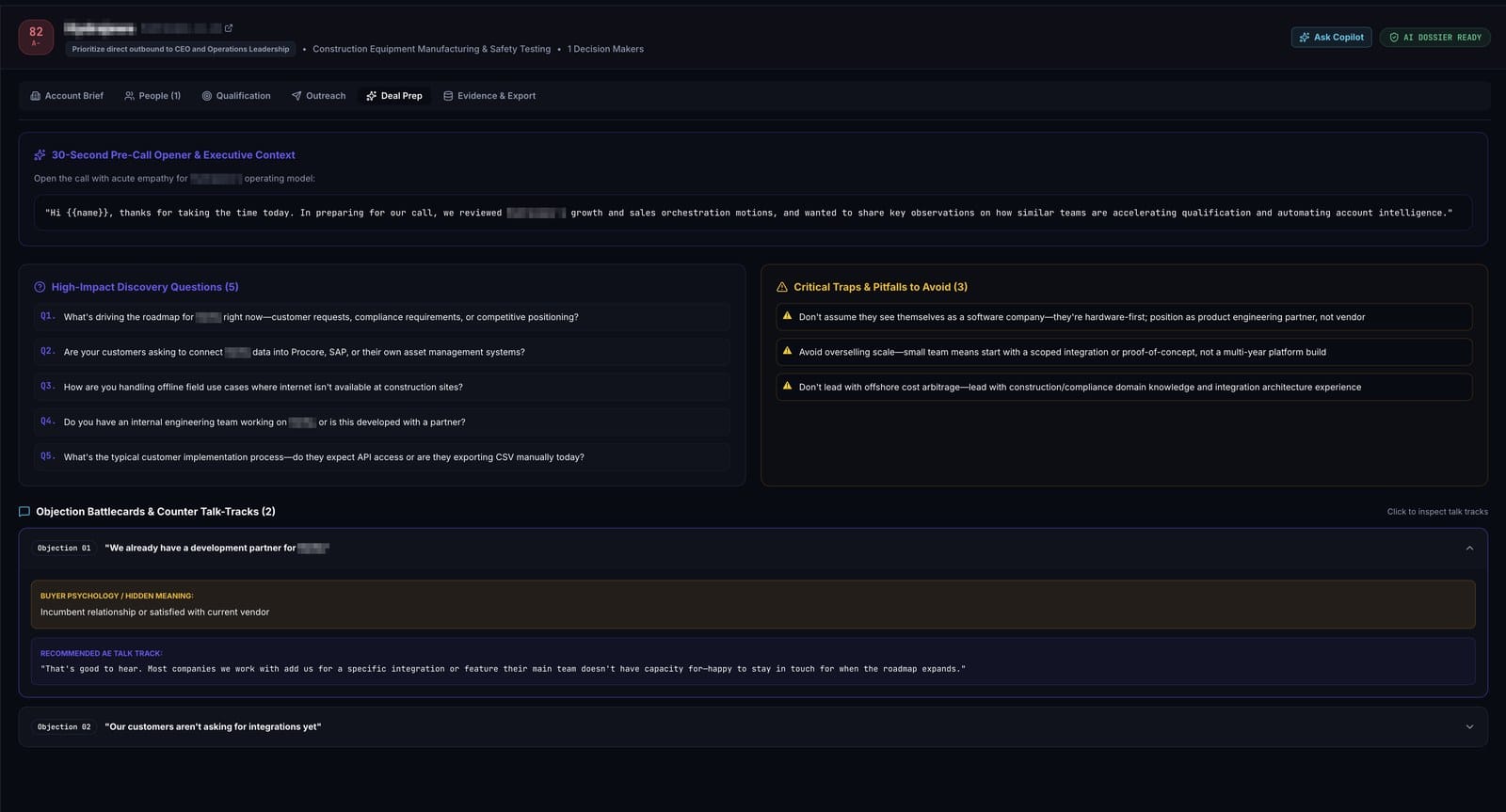
Deal Prep is written for the twenty minutes before a call.
A thirty second opener printed as a sentence you can read aloud, then five discovery questions drawn from the gaps in the qualification tab. The Critical Traps block beside them is blunter than most sales content: do not position your platform as a replacement for the system this account just built, and do not assume a lean team has bandwidth you never asked about.
The objection battlecards are worth reading twice. Each objection carries a Buyer Psychology line naming what it really means, then a talk track written out word for word.
Evidence
08
The audit trail, and what changed since last time
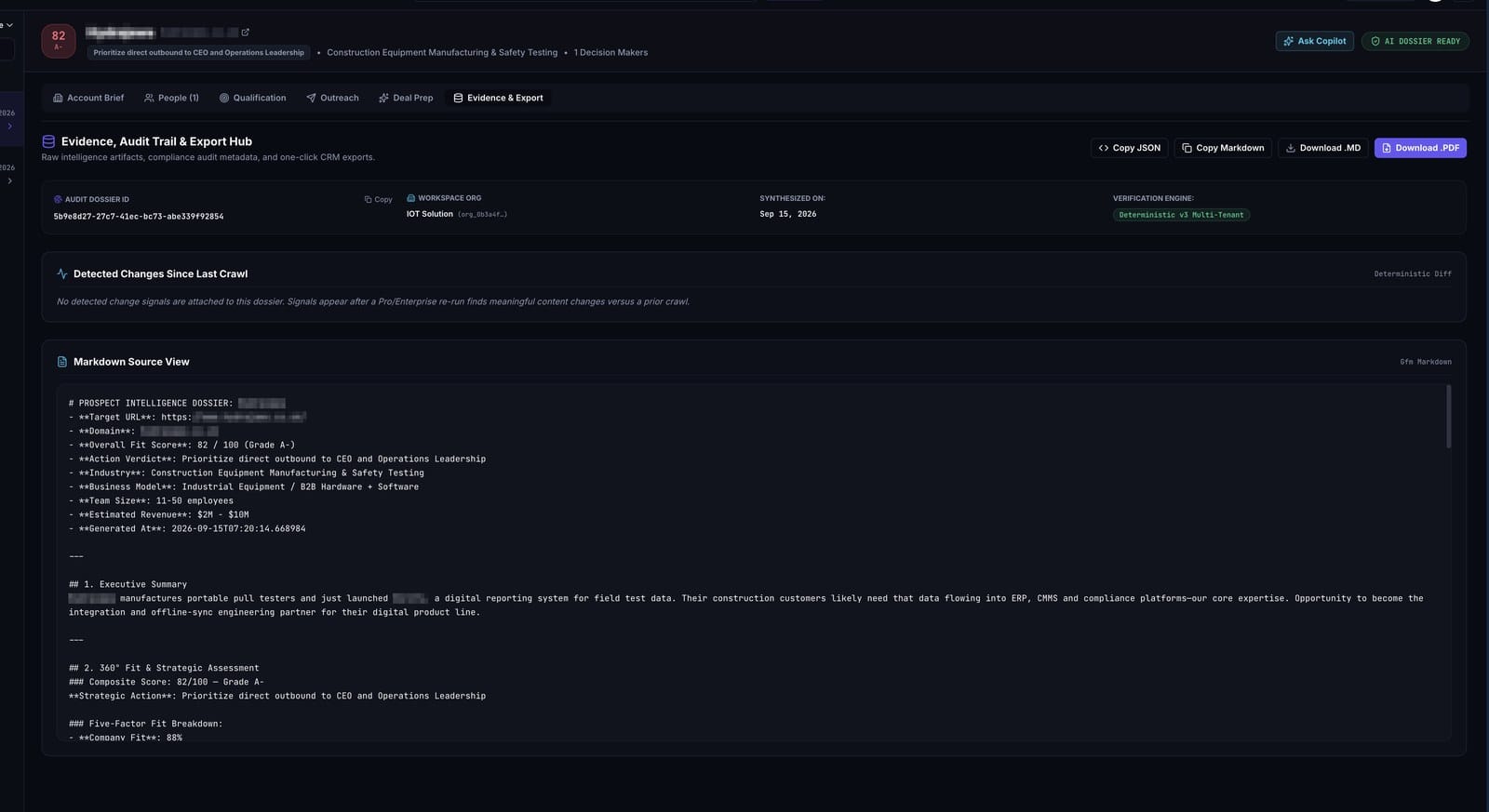
Every dossier gets an ID, a workspace stamp, a synthesis date and a named verification engine, so a claim in a brief can be traced back to the run that produced it.
The part that matters most is Detected Changes Since Last Crawl, a deterministic diff against the previous run listing each URL with its character count and the share that moved. On a first run the panel says exactly that, that signals appear once a re-run finds real changes against a prior crawl. Re-run an account in six weeks and you see what the company changed, which is a buying signal on its own.
Below it the whole dossier sits in plain Markdown, exactly as the engine wrote it, with Copy JSON, Copy Markdown, Download .MD and Download .PDF above.
Setup
09
The settings page decides how good the grades are
Sales OS does not guess who you sell to. Two blocks in Workspace Settings feed every score, and the difference between a useful A grade and a meaningless one is almost always here.
Seller Company Profile holds your industry, a description of what you sell, and your website. The engine reads it to decide which of the problems it finds are ones you can actually solve.
Ideal Customer Profile holds target industries, company size bands, target geography, and a free text field for qualification criteria and pain points. That last field carries more weight than the tag pickers above it. Ours reads: the company runs recurring physical inspections, has at least fifty field staff recording findings on paper or Excel, and has an ERP or CMMS that inspection data needs to reach.
Write the pain point field the way you would brief a new rep on their first day. Named systems, a headcount floor, the tools they use today, and the one thing that has to be true for the deal to exist. Adjectives such as innovative or fast growing add nothing to the score.
Plans
10
Credits, cost and plans
One credit equals one full research run on one domain. The billing page shows credits remaining, the allowance for the current cycle, and the estimated AI provider cost with the token count behind it. We have not found that number in the tools we used before this one. It is visible here because anyone paying for AI research should see what the research cost to produce.
| Plan | Price and credits | What it covers |
|---|---|---|
| Starter | $0 per month, 5 credits | Lite account brief with firmographics and tech stack, crawl and score synthesis, grading and action verdict, API at 5 requests a minute |
| Pro Growth | $19 per month, 200 credits | The full six tab dossier, Apollo verified committee contacts, personalized cold email cadences, MEDDIC and BANT scoring, PDF and Markdown export |
| Enterprise Scale | $49 per month, 1,000 credits | Everything in Pro, plus dedicated ingestion concurrency, RBAC admin controls, real time cost telemetry, SLA and priority support |
Billing runs through Stripe with the portal link on the same page. Above all of it a workspace holds members with assigned roles and a visible seat count, and sign in runs on Clerk with Google as the one click option.
Why We Built It
11
Why Dev Station built a sales tool
Dev Station Technology builds custom software for inspection, industrial and connected device operations. Three lines of work: digital quality inspection platforms, industrial IoT and telemetry systems, and embedded software including firmware and C++ on constrained hardware.
Our own buyers are operations and quality leaders at companies that run recurring physical inspections. That profile is hard to spot from a homepage. A third party inspection firm and an asset owner can look identical in a directory, while one of them is a prospect and the other already sells what we would be helping build. We were losing hours a week to that distinction, so we built the thing that settles it in one run, and the scoring rules we wrote for ourselves work for any team whose ICP depends on how a company operates day to day.
Sales OS is in early access. Tell us the domain you would test it on and we will send you a workspace with the first credits loaded.
FAQ
12
Frequently asked questions
What people ask in the first session.
What does one credit actually buy?
One complete research run on one domain: the crawl, the enrichment, the five axis scoring, the grade, the verdict and the written brief. Re-reading an account you already analyzed costs nothing.
Does it work on any website?
It reads what a site makes public, so a thin brochure site produces a thin brief. Companies with a services page, a careers page, named customers and a visible technology footprint give the engine enough to score. Where a signal is missing, the brief marks it as missing.
Who is it wrong for?
Anyone selling to consumers, and anyone whose qualification depends on data no website exposes, such as current contract end dates. The engine reads operational signals. Where those signals live behind a login, the axis comes back unscored and says so.
Want an AI assistant to summarize or cite this guide?
Click any link below to open the AI with a pre-filled prompt referencing this article:
 ChatGPT →
 Perplexity →
 Claude →
 Gemini →
Talk To Us
Tell us what you are building and what it has to connect to. An engineer answers, and you get a straight view of what the work would take.
Get In Touch →

